Now every one have Fast DSL connections at home and some of you have more than one computer at home. Many of us Fight who will use DSL and they don't know how to share a single DSL connection on many computers =)
Ok now today we will learn how to Share internet between two computers
First you have to make a network connection between 2 computers.
See this tutorial for more information: How to connect two computers via LAN
OK now you have to buy a LAN card from Computer accessories shop and attach it into server computer. (its recommended to make your PC a server in case other computer is a laptop).
Now you need an extra LAN cable and connect both computers.
Server Side:
Click on LAN card connected to DSL connection and select Properties.
Select Sharing Tab and CHECK "Allow other Network users to connect through this computer's Internet Connection".
Now on client Side.
For XP:
Start -> Control Panel -> Network Connections -> Local Area Networks -> Right Click -> Properties -> Select Internet Protocol (TCP/IP) and then click Properties -> Select Obtain an IP address Automatically and press Ok.
Start -> Control Panel -> Network and Sharing center -> Right Click on Local Area Network and select Properties. Rest of process is same as for XP
Enjoy Internet Sharing =))
Helpopedia provides valuable information on a variety of topics such as computer hardware, graphics, web development, networking and the like. You can also post your problems and get them solved at the touch of a button. Also, if you are interested in sharing and writing, please contact us on the following e-mail address: dihaz09@gmail.com We look forward to your active participation and suggestions. Helpopedia™
Showing posts with label Networking. Show all posts
Saturday, June 20, 2009
How to Connect Two Computers via LAN
You have two computers and you want to connect both of them for hard disk sharing or internet sharing than follow below instructions:
- First you need a LAN Cable.
- Plug Connectors in Both Computers.
To connect these two computers you have to make network connection. In a network connection you have to make one of them a server and other a Client. Lets we make XP a server.
Start -> Control Panel -> Network Connections -> Local Area Networks -> Right Click -> Properties -> Select Internet Protocol (TCP/IP) and then click Properties -> Select Use the Following IP address->
For Server Enter Following Addresses:
IP Address : 192.168.0.1
Subnet Mask : 255.255.255.0
Default Gateway : 192.168.0.1
If your Client (Laptop) also have XP in it then follow same above instructions and use
IP Address : 192.168.0.2
Subnet Mask : 255.255.255.0
Default Gateway : 192.168.0.1
If You want to make Vista Server or Client:
Start->Control Panel->Network and Sharing center
Right Click on Local Area Network and select Properties. Rest of process is same as of XP
Enjoy Sharing =))
Relevant Links:
how to share Hard Drives
Labels:
Internet Sharing,
Networking,
Vista Tweaks,
XP Tweaks
Sharing the hard disk on Windows
If You have two computers at home or a PC and a Laptop. and you want to share hard disk of one computer on other in vista then follow below instructions after connecting both computers via LAN =)
For Vista:
For Vista:
- Open My computer
- Right click on partition you want share like D: and then choose to share.
- In the new window click the Security tab.
- Click on the Edit button.
- Click the Add button.
- Type "guest" (without quotes) where the cursor blinks.
- Validate by clicking on the OK button.
- If you need to write on this disk from the network, check the "modification" in the authorizations.
- Then confirm by clicking OK.
- Please wait while Windows changed all authorizations.
- Click the Sharing tab.
- Click the Advanced Sharing button.
- In the new window, check Share this folder.
- Click on the Permissions button.
- Type "guest" (without quotes) where the cursor blinks.
- Validate by clicking on OK and OK again.
- If you need to write on this disk from the network, check the change in permits.
- Then confirm by clicking OK.
- Please wait while Windows changed all authorizations (several minutes if you share a lot of files).
- Open My computer
- Right click on partition you want share like D: and then choose to Properties.
- Select Sharing Tab
- Perform above step and Click Ok.
Friday, June 19, 2009
Have a check on internet Speed(only for LAN connection)
This is very important thing while using internet (DSL) you need to know if the provider of your dsl are giving you the speed you are paying for. For that the best software is NetMeter. Download Link for this software:


Now what about settings the NetMeter will appear you can chang the location by draging it
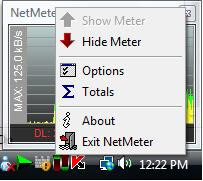
There is a new icon near to clock in task bar right click it

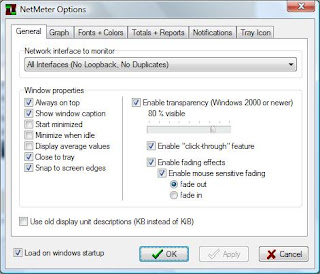
click option Following window will open

So i use 80 visible and fade out if the mouse come over it so that i can se the thinks behind it and can click through ti becouse its alway on top as i have selected it. You can do you setting as u want check that option use old display unit so that it will calculate in KB.
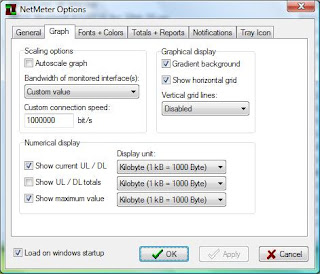
Now go to next tab that is graph tab you get the following window:

if you check autoscale graph it will change according to the maximum speed you get. As you know the speed of your dsl so we select it by Bandwidth. if you dont able to find it as there is no option for 1MBps speed so you have to give 1000000 for 1MB. Select the Kilobyte(1kB = 1000Byte) in all display unit
These where the necessary Settings for NetMeter you can edit the settings in other tabs but they are not necessary.
Thanx for Visting
Have a nice day
Helpopedia Team
Subscribe to:
Posts (Atom)